
SIX
Connecting a SIX payment terminal allows you to offer a fluid payment flow to your customers and ease the work of your cashiers.
경고
Although Worldline has acquired SIX Payment Services and both entities utilize Yomani payment terminals, their firmware differs. Terminals supplied by Worldline are, therefore, incompatible with this integration.
환경설정
전제 조건
Install the POS IoT Six module: Activate the POS IoT Six module module to enable the payment terminal.
참고
이 모듈은 POS Six 모듈을 대체합니다.
Connect an IoT system: A Raspberry Pi or a virtual IoT system (for Windows OS only) is required to connect a SIX payment terminal to Odoo.
결제 수단 환경설정하기
Enable the payment terminal in the application settings and create a payment method for SIX terminals.
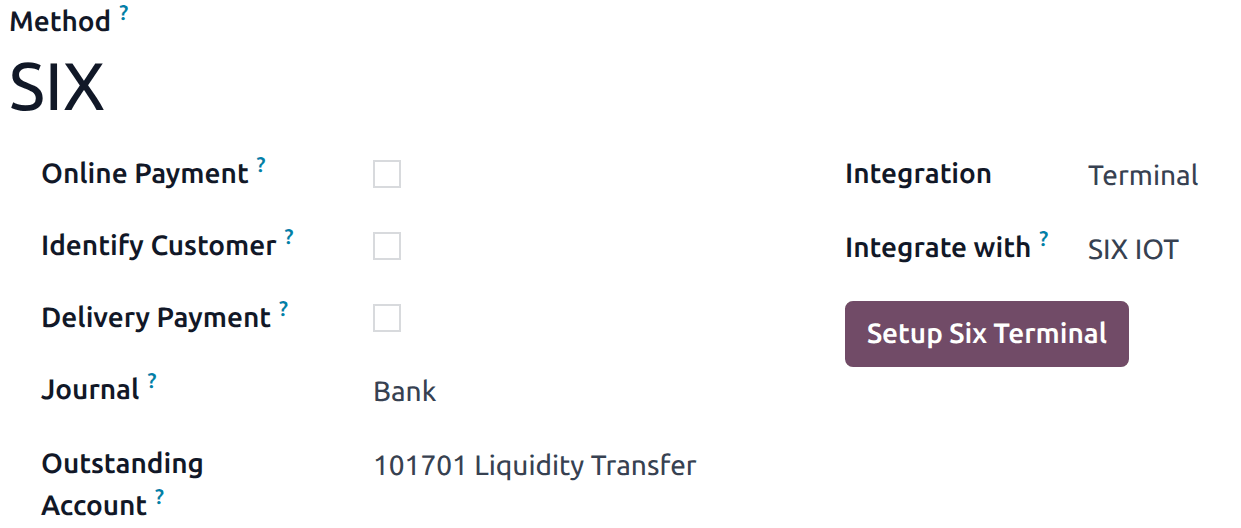
전표 유형을 은행 으로 설정합니다.
미납 계정 필드를 입력하세요.
통합 필드에서 단말기 를 선택합니다.
통합 대상 필드에서 SIX IOT 를 선택합니다.
터미널 6 설정 을 클릭하세요.
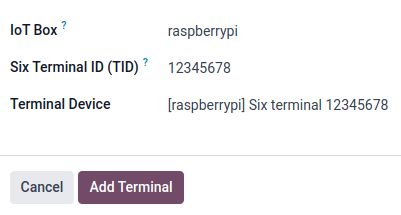
모달 창에서,
Click the IoT Box field and select the IoT system from the dropdown menu.
SIX에서 받은 Six 단말기 ID(TID) 를 입력합니다.
드롭다운 메뉴에서 단말기 를 선택합니다.
마지막으로 터미널 추가 를 클릭합니다.
참고
Ensure the SIX terminal is online and connected to the same network as the IoT system.
POS에 결제 수단 연결하기
Once the payment method is created, it can be selected in the POS settings. To do so,
POS 설정 으로 이동합니다.
Add the payment method under the Payment methods field within the Payment section.