
크기
중요
EU 회원국에서 저울을 통합 장치로 사용하려면 법적인 인증을 받아야 합니다
사전 준비
저울을 연결하려면 IoT 시스템 사용이 필수입니다.
더 보기:
환경설정
저울 연결
아래로 스크롤하여 연결된 장치 섹션으로 이동한 후 IoT 박스 를 활성화합니다.
전자 저울 필드에서 저울을 선택합니다.
:guilabel:`저장`을 클릭합니다.
팁
Alternatively, click the (Dropdown menu) icon on a POS card and click Edit to access this setting.
품목 설정
In order to weigh products using an integrated scale, go to , create a product or open an existing product form, and configure it as follows:
Ensure the Point of Sale checkbox is activated for the product to be available in POS.
일반 정보 탭에서 kg 당 판매 가격 을 지정합니다.
참고
This step requires to enable the Units of Measure feature. To activate it:
으로 이동합니다.
품목 섹션까지 아래로 스크롤을 이동한 후 측정 단위 기능을 활성화합니다.
Go to the Point of Sale tab and activate To Weigh With Scale. This enables the product to be weighed directly on the connected scale at the POS.
중요
The selected unit of measure for weighable products must be kg to ensure compliance with European regulations.
더 보기:
유럽 규정
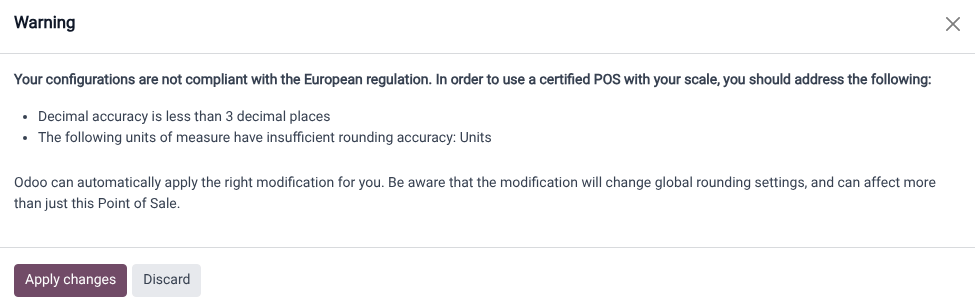
상거래 목적으로 저울을 사용하는 경우, 저울과 연동된 데이터베이스는 반드시 유럽에서 규정하는 요건에 부합하도록 설정해야 합니다. 여기에는 정확도를 위해 소수점 이하 세 자리 이상을 지원하거나 일반적인 단위 대신 `kg`과 같은 측정 단위에 반올림을 알맞게 적용하는 내용 등이 포함됩니다.
데이터베이스가 규정에 부합하지 못하는 경우 빨간색 (저울) 아이콘이 경고로 표시됩니다. 이 아이콘을 클릭하면 규정에 불부합하는 사유를 확인할 수 있으며, 변경 사항 적용 을 선택하면 필수적인 변경 사항이 설정에 자동으로 적용됩니다. 데이터베이스가 모든 규정 요건을 충족하게 되면 (저울) 아이콘이 초록색으로 바뀝니다.
추가 가이드라인
Both the customer and POS displays must have a minimum diagonal size of 6 inches. For optimal readability, larger screens are recommended.
PoS에서 저울 사용하기
Select the product to weigh on the order screen or scan its barcode.
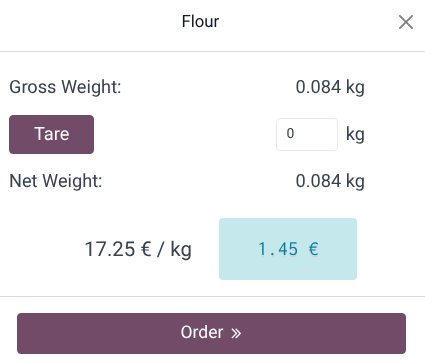
Place the product on the scale and wait for the weight to be displayed in the popup window.
중량 측정이 완료되면 가격이 자동으로 계산됩니다.
주문 을 클릭한 후 장바구니에 품목을 추가합니다.
저울에 지정되어 있는 이전 품목을 제거합니다.
중요
Make sure the scale returns to zero before weighing a new product. If it does not, the
Order button remains unclickable until it is reset.