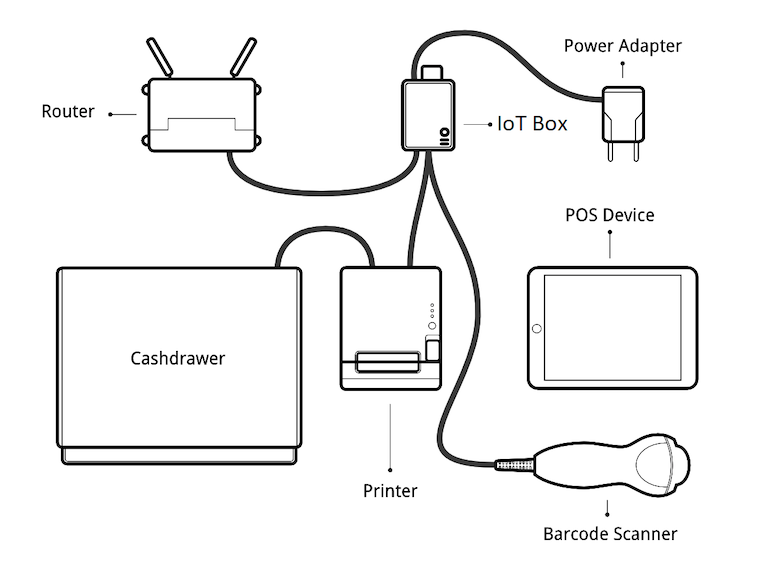
IoT 시스템 연결
POS를 IoT 시스템 에 연결하려면:
Make sure both the Point of Sale and Internet of Things (IoT) apps are installed on your database.
IoT 박스 또는 Windows 가상 IoT 를 설정합니다.
주변 장치를 IoT 시스템에 연결합니다:
장치
지침
프린터
Connect a supported receipt printer to a USB port or to the network, and power it on. Refer to Order printing.
금전 등록기
금전 등록기는 RJ25 케이블로 프린터에 연결해야 합니다.
바코드 스캐너
The barcode scanner must end barcodes with an
ENTERcharacter (keycode 28) in order for the barcode scanner to be compatible. This is most likely the barcode scanner’s default configuration.크기
고객 디스플레이
Connect a screen to the IoT box to display the PoS order.
결제 단말기
연결 프로세스는 단말기에 따라 다릅니다. 결제 단말기 문서 를 참조하세요.
IoT 시스템을 Odoo 데이터베이스에 연결합니다.
In the Connect to a Point of Sale popup that opens, select the Associated POS and click Continue. The IoT system and its devices are automatically linked to the POS.
팁
Alternatively, access the POS settings and select the POS, or click the vertical ellipsis button (⋮) on a POS card and click Edit. Then, enable IoT Box, select the devices to use with the POS, and click Save.
더 보기:
지원되는 하드웨어 목록 입니다.
설정 예시