
Recibos
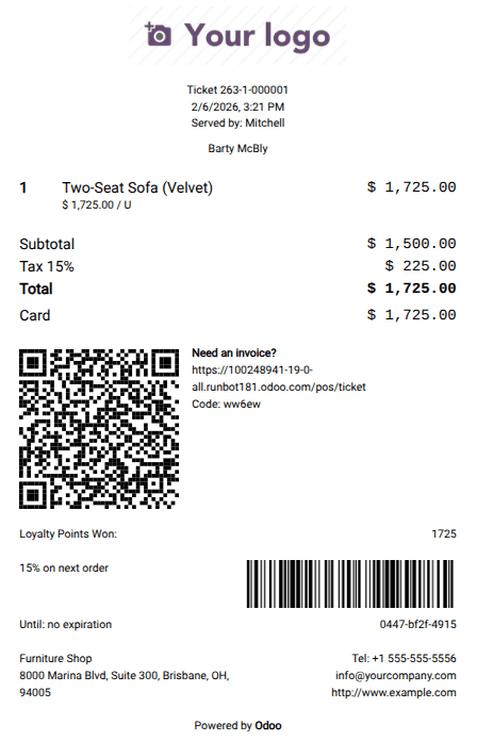
Los recibos del PdV muestran los siguientes elementos:
|
|
Configuración
To set up POS receipts, go to , and scroll down to the Bills & Receipts section.
To customize the header and footer, enable the Custom Header & Footer setting and enter the information to be printed on the receipts in both fields.
To print receipts automatically upon payment confirmation, enable the Automatic Receipt Printing setting.
Selecciona la opción Recibo básico para imprimir recibos sin mostrar los precios de los productos.
To allow for sending receipts via email, SMS, or WhatsApp from the Receipt screen, enable the SMS Enabled and/or WhatsApp Enabled setting(s).
Nota
La opción Envío por WhatsApp solo está disponible si el módulo Mensajes de WhatsApp está instalado.
Consulta
Receipt reprint
To reprint a receipt, follow the next steps:
Access the POS register.
Click Orders on the POS interface.
Open the dropdown selection menu next to the search bar, and set the filter to Paid.
Select the desired order and click Print Receipt.
Truco
Filtra la lista de órdenes con la barra de búsqueda. Escribe la referencia y selecciona Número de recibo, Fecha o Cliente.