
DPO Pay
DPO Pay offers in-store payment solutions for customer transactions through several physical terminals. These terminals support swiping, scanning, or tapping credit and debit cards (Visa, MasterCard, and American Express), as well as Mobile payments (Airtel Money and M-Pesa).
Important
DPO Pay payment terminals do not require an IoT system to operate.
The Odoo DPO Pay module is only available for companies operating in the African region.
A DPO merchant account is required to process transactions.
DPO Pay credentials
Create a DPO Pay account and order at least one terminal. Once ordered, the sales team contacts you for the onboarding process and then sends an email containing the following credentials:
ID Client
Client Secret
ID Comerciant
Terminal ID
Chain ID
Configurație Odoo
Configurați metoda de plată
To connect the DPO Pay terminal with Odoo Point of Sale, follow these steps:
Install the PoS DPO Pay module.
Creați o nouă metodă de plată:
Accesați și faceți clic pe Nou.
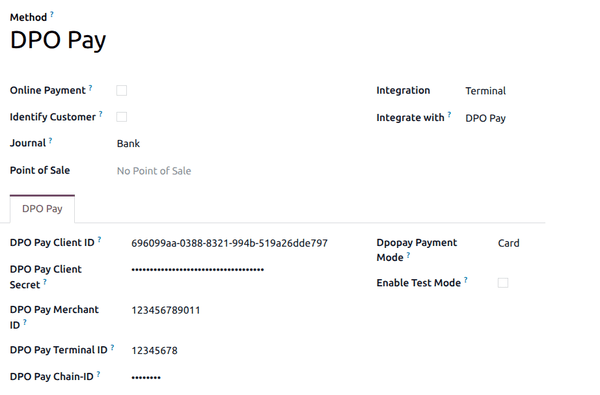
Set the Journal field to Bank.
Set the Integration field to Terminal.
Set the Integrate with field to DPO Pay.
Add the credentials to their corresponding fields.
Adăugați metoda de plată la un POS
Pentru a adăuga o metodă de plată la punctul de vânzare:
Go to the POS settings.
Selectați POS-ul în câmpul Punct de vânzare.
Add the payment method under the Payment Methods field in the Payment section.
Sfat
Enable DPO Pay Test Mode to test transaction processes with a device.