
递延收入
递延收入,或**未获收入**,是就尚未交付的货物或尚未提供的服务向客户开具的发票。
公司不能在当前的**损益表**或**收入表**中报告,因为货物和服务将在未来有效交付/提供。
这些未来的收入必须在公司资产负债表的流动负债中递延,直到可以在损益表中一次性或在一个确定的时期内**确认**。
例如,假设一家企业出售了一个为期 1 年、价值 1200 美元的软件许可。他们立即向客户开具发票,但不能将其视为已经获得的收入,因为尚未提供未来几个月的许可证。因此,他们将这笔新收入记入递延收入账户,并按月确认。在接下来的 12 个月中,每个月都将有 100 美元确认为收入。
Odoo 会计系统处理递延收入的方式是将其分摊到多个分录中,并定期公布。
注解
服务器每天检查一次条目是否必须发布。可能需要 24 小时才能看到 草稿 变为 已发布。
配置
确保为您的业务正确配置默认设置。为此,请访问 。可使用以下选项:
- 日记账
递延分录记入该日记账。
- 递延收入
收入在确认之前在本流动负债账户中递延。
- 生成记项
默认情况下,当您发布客户发票时,Odoo 自动生成 递延账目。但是,您也可以选择 手动生成,方法是选择 手动操作和分组 选项。
- 基于
There are three ways to calculate the deferred revenue recognition:
Days: The total amount is divided equally by the total number of days in the period, inclusive of the start and end dates.
Months: Each full month represents an equal proportion of the total amount, regardless of the actual number of days in that month (standardized basis).
Full Months: Any month started is treated as a complete month. However, the final month is only considered full if the period extends to the very last day of that month.
假设一张 1200 美元的发票必须延期 12 个月。
月份 选项根据每个月的天数计算不同的金额(例如,1 月份 ~ 102 美元,2 月份 ~ 92 美元)。
如果 月份 选项设置为每月 15 日,则每月按比例收取 100 美元(例如,如果 开始日期 设置为每月 15 日,则第一个月收取 50 美元)。
使用 整月 选项时,开始的每个月都是满月(例如,即使 开始日期 设置为每月的 15 日,第一个月也是 100 美元);这意味着使用 整月 选项时,第一个月的 100 美元将被全额确认,而无需像使用 月份 选项时那样,在第 13 个月确认剩余部分。
在验证时生成递延分录
小技巧
Make sure the Deferred Date field is visible in the Invoice Lines tab. In most cases, the start of the deferred period should be in the same month as the Invoice Date. Deferred revenue entries are posted from the invoice date and are displayed in the report accordingly.
为发票中应延迟的每一行指定延迟期的开始和结束日期。
如果**设置**中的 生成分录`字段设置为 :guilabel:`发票/账单验证时,Odoo 会在发票验证时自动生成递延分录。点击 递延分录 智能按钮查看。
在发票的会计日期当天,有一笔分录将发票金额从收入账户转移至递延账户。而其他的递延分录则逐月将发票金额从递延账户转移回收入账户,以逐步确认收入。
Example
您可以将 1 月份的 1200 美元发票递延 12 个月,指定开始日期为 2023 年 1 月 1 日,结束日期为 2023 年 12 月 31 日。8 月底,800 美元被确认为收入,而 400 美元仍留在递延账户上。
报表
递延收入报告计算每个账户必要的递延分录概览。要访问它,请转到 。
要查看每个账户的日记账项目,请点击账户名称,然后点击 日记账项目。
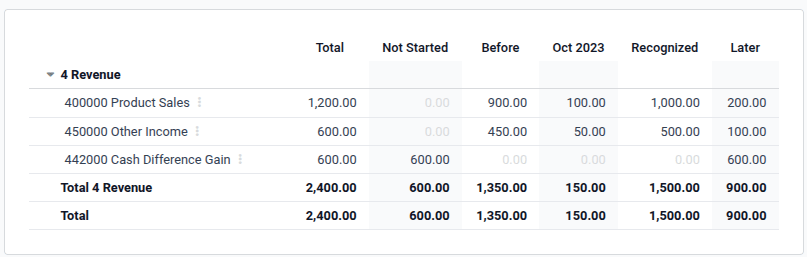
注解
只有会计日期在报告期结束之前的发票才会被考虑在内。
手动生成分组递延分录
如果有大量递延收入,并希望减少创建的日记账分录数量,可以手动生成递延分录。为此,请将**设置**中的 生成分录`字段设置为 :guilabel:`手动和分组。然后,Odoo 会将递延金额汇总到一个条目中。
每月月底,进入 ,然后单击 :guilabel:`生成分录`按钮。这将生成两个递延分录:
月末的一个日期,汇总了每个账户当月的所有递延金额。这意味着部分递延收入在该期末得到确认。
撤销已创建的分录,需要在随后的日期(即下个月的第一天)创建一条冲销的记录。
Example
There are three invoices deferred based on Months:
发票 A:$ 1200,从 2023 年 1 月 1 日递延至 2023 年 12 月 31 日
发票 B:$ 600,从 2023 年 1 月 1 日递延至 2023 年 12 月 31 日
Invoice C: $600 to be deferred in a future period (it will appear on the Not Started column)
- 一月
一月底,点击 生成分录 按钮后,会出现以下分录:
分录 1,日期为 1 月 31 日:
Line 1: Income account -1200 -600 -600 = -2400 (cancelling the total of all invoices)
Line 2: Income account 100 + 50 = 150 (recognizing 1/12 of invoice A and invoice B)
Line 3: Deferred account 2400 - 150 = 2250 (amount that has yet to be deferred later on)
分录 2,日期为 2 月 1 日,用于撤销先前的分录:
Line 1: Income account 2400
Line 3: Income account -150
Line 2: Deferred account -2250
- 二月
二月底,点击 生成分录 按钮后,会出现以下分录:
分录 1,日期为 2 月 28 日:
Line 1: Income account -1200 -600 -600 = -2400 (cancelling the total of all invoices)
Line 2: Income account 200 + 100 = 300 (recognizing 2/12 of invoice A and invoice B)
Line 3: Deferred account 2400 - 300 = 2100 (amount that has yet to be deferred later on)
分录 2,日期为 3 月 1 日,用于撤销先前的分录。
- From March to November
The same computation is done for each month until November.
- 十二月
There is no need to generate entries in December.
- 总计
如果我们把一切都汇总起来,我们就会有:
Invoice A and invoice B
Two entries (one for the deferral and one for the reversal) for each month from January to November
Invoice C will be deferred later
因此,在 12 月底,尽管产生了多个分录,通过撤销机制,发票 A 和发票 B 只被确认为一次完全的收入。