
比例
重要
在欧盟成员国,<https://eur-lex.europa.eu/legal-content/EN/TXT/?uri=uriserv%3AOJ.L_.2014.096.01.0107.01.ENG>`_将衡器作为集成设备使用必须依法获得认证。
Prerequisite
Connecting a scale requires the use of an IoT System.
其他资料
配置
Scale connection
向下滚动到 已连接设备 部分并启用 IoT 盒子。
在 电子秤 字段中选择电子秤。
点击:guilabel:
保存。
小技巧
Alternatively, click the (Dropdown menu) icon on a POS card and click Edit to access this setting.
产品配置
In order to weigh products using an integrated scale, go to , create a product or open an existing product form, and configure it as follows:
Ensure the Point of Sale checkbox is activated for the product to be available in POS.
On the General Information tab, define a Sales Price per kg.
注解
This step requires to enable the Units of Measure feature. To activate it:
Go to .
Scroll down to the Products section and activate Units of Measure.
Go to the Point of Sale tab and activate To Weigh With Scale. This enables the product to be weighed directly on the connected scale at the POS.
重要
The selected unit of measure for weighable products must be kg to ensure compliance with European regulations.
其他资料
European regulations
When using scales in commercial transactions, the database integrated with a scale must be
configured to meet specific European requirements. This includes supporting at least three decimal
places for accuracy and using proper rounding for units of measure, such as kg instead of generic
units.
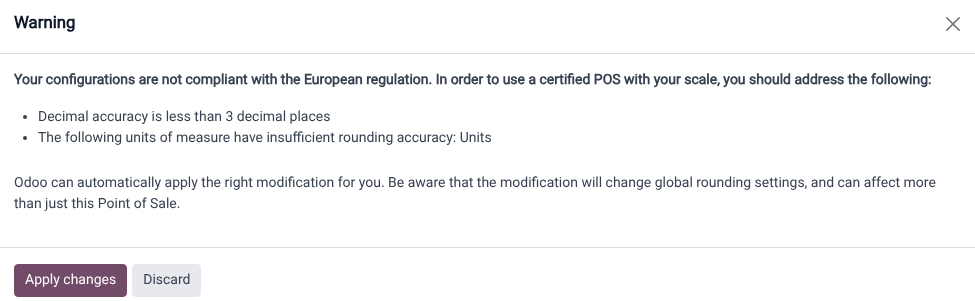
If the database is not compliant, a red (scale) icon displays as a warning. Click this icon to view the reasons for non-compliance and then select Apply changes to automatically apply the necessary changes to the settings. Once the database meets all regulatory requirements, the (scale) icon turns green.
Additional guidelines
Both the customer and POS displays must have a minimum diagonal size of 6 inches. For optimal readability, larger screens are recommended.
Using a scale in PoS
Select the product to weigh on the order screen or scan its barcode.
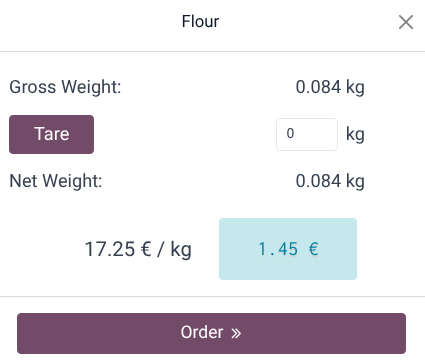
Place the product on the scale and wait for the weight to be displayed in the popup window.
Once the weight is determined, the price is automatically computed.
Click Order to add the product to the cart.
Remove the previous product from the scale.
重要
Make sure the scale returns to zero before weighing a new product. If it does not, the
Order button remains unclickable until it is reset.