
Deferred expenses
Deferred expenses and prepayments (also known as prepaid expenses) are both costs that have already occurred for products or services yet to be received.
Such costs are assets for the company that pays them since it already paid for products and services but has either not yet received them or not yet used them. The company cannot report them on the current profit and loss statement, or income statement, since the payments will be effectively expensed in the future.
These future expenses must be deferred on the company’s balance sheet until the moment in time they can be recognized, at once or over a defined period, on the profit and loss statement.
For example, let’s say we pay $1200 at once for one year of insurance. We already pay the cost now but haven’t used the service yet. Therefore, we post this new expense in a prepayment account and decide to recognize it on a monthly basis. Each month, for the next 12 months, $100 will be recognized as an expense.
Odoo Accounting handles deferred expenses by spreading them across multiple entries that are posted periodically.
Nota
O servidor verifica uma vez por dia se um lançamento deve ser efetuado. Pode levar até 24 horas para que você veja uma alteração de Rascunho para Lançado.
Configuração
Certifique-se de que as definições padrão estejam corretamente configuradas para sua empresa. Para fazer isso, vá para . As seguintes opções estão disponíveis:
- Diário
Os lançamentos diferidos são realizados nesse diário.
- Despesa diferida
As despesas são diferidas nessa conta, de Ativo Circulante, até que sejam reconhecidas.
- Gerar lançamentos
By default, Odoo automatically generates the deferral entries when you post a vendor bill. However, you can also choose to generate them manually by selecting the Manually & Grouped option instead.
- Baseado em
There are three ways to calculate the deferred expenses recognition:
Days: The total amount is divided equally by the total number of days in the period, inclusive of the start and end dates.
Months: Each full month represents an equal proportion of the total amount, regardless of the actual number of days in that month (standardized basis).
Full Months: Any month started is treated as a complete month. However, the final month is only considered full if the period extends to the very last day of that month.
Suppose a bill of $1200 must be deferred over 12 months.
A opção Dias contabiliza valores diferentes, dependendo do número de dias em cada mês (ex.: ~US$ 102 para janeiro e ~US$ 92 para fevereiro).
A opção Meses contabiliza US$ 100 a cada mês, rateados de acordo com o número de dias do mês (por exemplo, US$ 50 para o primeiro mês se a Data de início for definida para o dia 15 do mês).
A opção Meses inteiros considera cada mês iniciado como completo (ex.: US$ 100 para o primeiro mês, mesmo que a Data de início esteja definida para o dia 15 do mês); isso significa que, com a opção Meses inteiros, US$ 100 completos são reconhecidos no primeiro mês parcial, eliminando a necessidade de um 13º mês para reconhecer o restante, como seria o caso ao usar a opção Meses.
Gerar lançamentos de diferimento na validação
Dica
Make sure the Deferred Date field is visible in the Invoice Lines tab. In most cases, the start of the deferred period should be in the same month as the Accounting Date. Deferred expense entries are posted from the accounting date and are displayed in the report accordingly.
For each line of the bill that should be deferred, specify the start and end dates of the deferral period.
If the Generate Entries field is set to On invoice/bill validation, Odoo automatically generates the deferral entries when the bill is validated. Click on the Deferred Entries smart button to see them.
One entry, dated on the same day as the bill’s accounting date, moves the bill amounts from the expense account to the deferred account. The other entries are deferral entries which will, month after month, move the bill amounts from the deferred account to the expense account to recognize the expense.
Example
You can defer a January bill of $1200 over 12 months by specifying a start date of 01/01/2023 and an end date of 12/31/2023. At the end of August, $800 is recognized as an expense, whereas $400 remains on the deferred account.
Relatórios
The deferred expense report computes an overview of the necessary deferral entries for each account. To access it, go to .
Para visualizar os itens de diário de cada conta, clique no nome da conta e, em seguida, em Itens de diário.
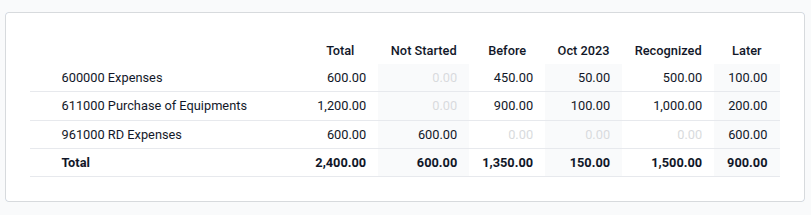
Nota
Only bills whose accounting date is before the end of the period of the report are taken into account.
Gerar manualmente lançamentos de diferimento agrupados
Se você tiver muitas receitas diferidas e quiser reduzir o número de lançamentos contábeis manuais criados, poderá gerar lançamentos de diferimento manualmente. Para isso, defina o campo Gerar lançamentos nas Definições como Manualmente e agrupado. Em seguida, o Odoo agrega os valores diferidos em um único lançamento.
At the end of each month, go to the Deferred Expenses report and click the Generate Entries button. This generates two deferral entries:
One dated at the end of the month which aggregates, for each account, all the deferred amounts of that month. This means that at the end of that period, a part of the deferred expense is recognized.
O estorno desse lançamento criado, datado do dia seguinte (ou seja, o primeiro dia do mês seguinte) para cancelar o lançamento anterior.
Example
There are three bills deferred based on Months:
Bill A: $1200 to be deferred from 01/01/2023 to 12/31/2023
Bill B: $600 to be deferred from 01/01/2023 to 12/31/2023
Bill C: $600 to be deferred in a future period (it will appear on the Not Started column)
- Em janeiro
No final de janeiro, depois de clicar no botão Gerar lançamentos, há as seguintes lançamentos:
Lançamento 1 datado em 31 de janeiro:
Line 1: Expense account -1200 -600 -600 = -2400 (cancelling the total of all bills)
Line 2: Expense account 100 + 50 = 150 (recognizing 1/12 of bill A and bill B)
Line 3: Deferred account 2400 - 150 = 2250 (amount that has yet to be deferred later on)
Lançamento 2 datado em 1º de fevereiro, o estorno do lançamento anterior:
Line 1: Expense account 2400
Line 3: Expense account -150
Line 2: Deferred account -2250
- Em fevereiro
No final de fevereiro, depois de clicar no botão Gerar lançamentos, há os seguintes lançamentos:
Lançamento 1 datado em 28 de fevereiro:
Line 1: Expense account -1200 -600 -600 = -2400 (cancelling the total of all bills)
Line 2: Expense account 200 + 100 = 300 (recognizing 2/12 of bill A and bill B)
Line 3: Deferred account 2400 - 300 = 2100 (amount that has yet to be deferred later on)
Lançamento 2 datado em 1º de março, o estorno do lançamento anterior.
- From March to November
The same computation is done for each month until November.
- Em dezembro
There is no need to generate entries in December.
- No total
Se agregássemos tudo, teríamos:
Bill A and Bill B
Two entries (one for the deferral and one for the reversal) for each month from January to November
Bill C will be deferred later
Therefore, at the end of December, bills A and B are fully recognized as expense only once in spite of all the created entries thanks to the reversal mechanism.