
PDF quote builder
The PDF Quote Builder in the Odoo Sales app transforms a standard, text-heavy quote into a polished, branded proposal. Instead of sending a table of products and prices, it enables users to sandwich a quotation between professionally designed PDF pages.
The PDF Quote Builder seamlessly combines user-provided marketing documents, technical sheets, branded cover pages, and Odoo-generated quotes in one document. Quotation templates can be configured to include specific PDFs in the quote, ensuring documents reach the intended customers. Dynamic text in PDF templates allows users to extract Sales app data and customize files for each project or customer.
Empty text fields on the PDF can be completed directly from the quotation form in the Sales app. This approach lets users personalize quotes without editing the PDF itself.
Users can also configure PDFs on the product form. These files are then automatically added to the quote when a product is included. Beyond assembling quotes, the PDF Quote Builder also enables PDFs to be featured on the online store product page. This ensures customers can access detailed product information directly on the website.
Note
It is recommended to edit PDF forms with Adobe software. The form fields in the header and footer PDF templates are required to retrieve dynamic values in Odoo.
Configuration
To add custom PDF files to quotes, the PDF Quote builder feature must be configured.
Navigate to . Scroll to the Quotations & Orders section, enable the PDF Quote builder feature, then click Save.
Add PDF as Header/Footer
Important
Odoo does not permit spaces in PDF field names. Only use letters, numbers, hyphens, or underscores.
The Odoo Sales app can add a custom PDF as a header or footer. The Quote Builder tab in a quote allows the selection of multiple headers and footers for insertion into the final PDF quote.
To add a custom PDF as a header or footer, navigate to . On this page, click New to create a new header or footer, or click Upload to add a PDF file.
Clicking Upload lets the user select a PDF file from their computer. Select the Document Type to set the order in which the PDF appears in the quote. Header places the PDF before the quote, and Footer places it after. Further configuration can be done by clicking the (vertical ellipsis) icon in the top-right corner of the document card and selecting Edit.
Click New to open a blank document form. In the File Content field, click the Upload your file button and select the PDF to upload. Once uploaded, Odoo automatically names the document after the file name. The Name field then becomes editable.
To modify the uploaded file, click the (Edit), (Download), or (Clear) icon next to the file name. If the PDF includes form fields, they are automatically recognized as dynamic text fields. View and edit these fields by clicking Configure dynamic fields. For more details, refer to Configure dynamic form fields in PDFs.
The Quotation templates field assigns the PDF to the selected template, restricting the PDF’s use to that template.
Note
Headers and footers can also be added to a quotation template by navigating to . Select a template and then in the Quote Builder tab, Add or Upload a PDF directly.
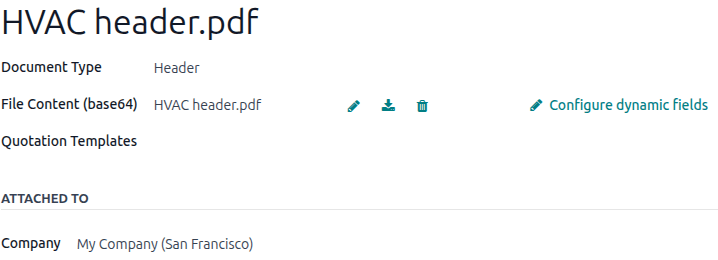
The HVAC PDF file is configured as a Header and the Sales app recognizes the form fields as dynamic text fields.