
SIX
A conexão de um terminal de pagamento SIX permite oferecer um fluxo de pagamento fluido a seus clientes e facilitar o trabalho de seus caixas.
Aviso
Although Worldline has acquired SIX Payment Services and both entities utilize Yomani payment terminals, their firmware differs. Terminals supplied by Worldline are, therefore, incompatible with this integration.
Configuração
Pré-requisitos
Install the POS IoT Six module: Activate the POS IoT Six module module to enable the payment terminal.
Nota
Este módulo substitui o PDV Six.
Connect an IoT system: A Raspberry Pi or a virtual IoT system (for Windows OS only) is required to connect a SIX payment terminal to Odoo.
Configurar a forma de pagamento
Enable the payment terminal in the application settings and create a payment method for SIX terminals.
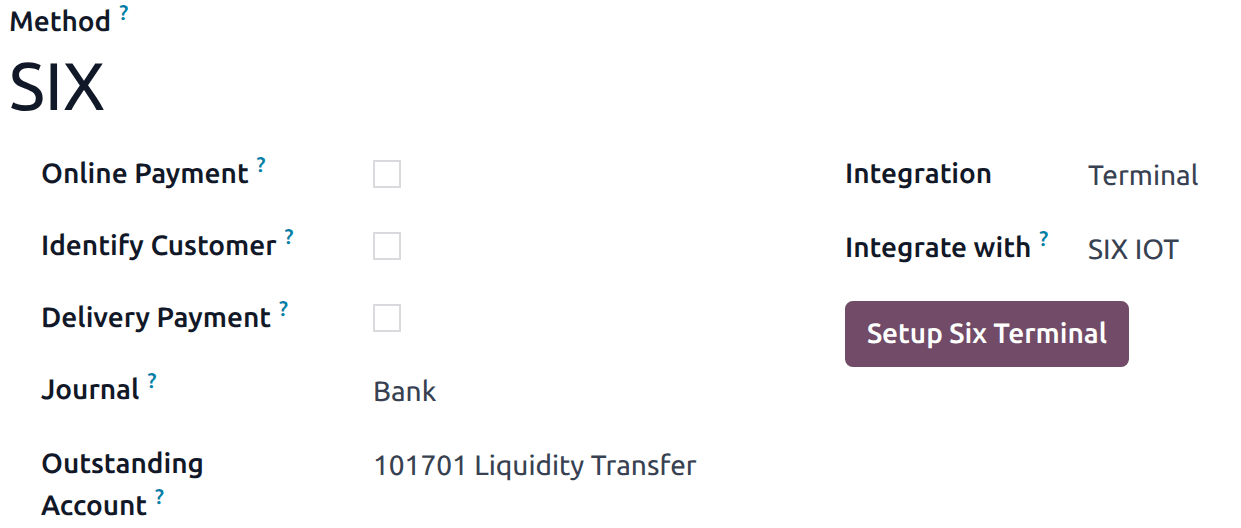
Definir o tipo de diário como Banco.
Fill in the Outstanding Account field.
Select Terminal in the Integration field.
Select SIX IOT in the Integrate with field.
Click Setup Six Terminal.
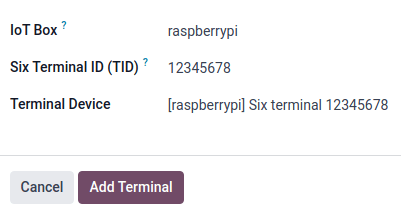
In the modal window,
Click the IoT Box field and select the IoT system from the dropdown menu.
Enter the Six Terminal ID (TID) provided by SIX.
Select the Terminal Device from dropdown menu.
Finally, click Add Terminal.
Nota
Ensure the SIX terminal is online and connected to the same network as the IoT system.
Vincular a forma de pagamento a um PDV
Once the payment method is created, it can be selected in the POS settings. To do so,
Go to the POS’ settings.
Add the payment method under the Payment methods field within the Payment section.